 Eyno
Download

Eyno Paper · PDF
A PDF editor for Mac that works page by page
Eyno Paper is a PDF editor for Mac. It opens your PDFs so you can read them, mark them up, sign them and rearrange their pages. A contract to sign, a blank page to pull out of a scan, an account number to hide before you send the file. It all happens in one window, and the document never leaves your Mac.
What Eyno Paper does
To edit a PDF on Mac, Paper sorts everything into three modes at the top of the window, Read, Annotate and Pages. One click moves you from one to the next, with no digging through menus. The Thumbnails column on the left, ⌥ ⌘ S, opens with the line Everything stays on this Mac, and it means it. No file is uploaded anywhere to be processed.
Pages
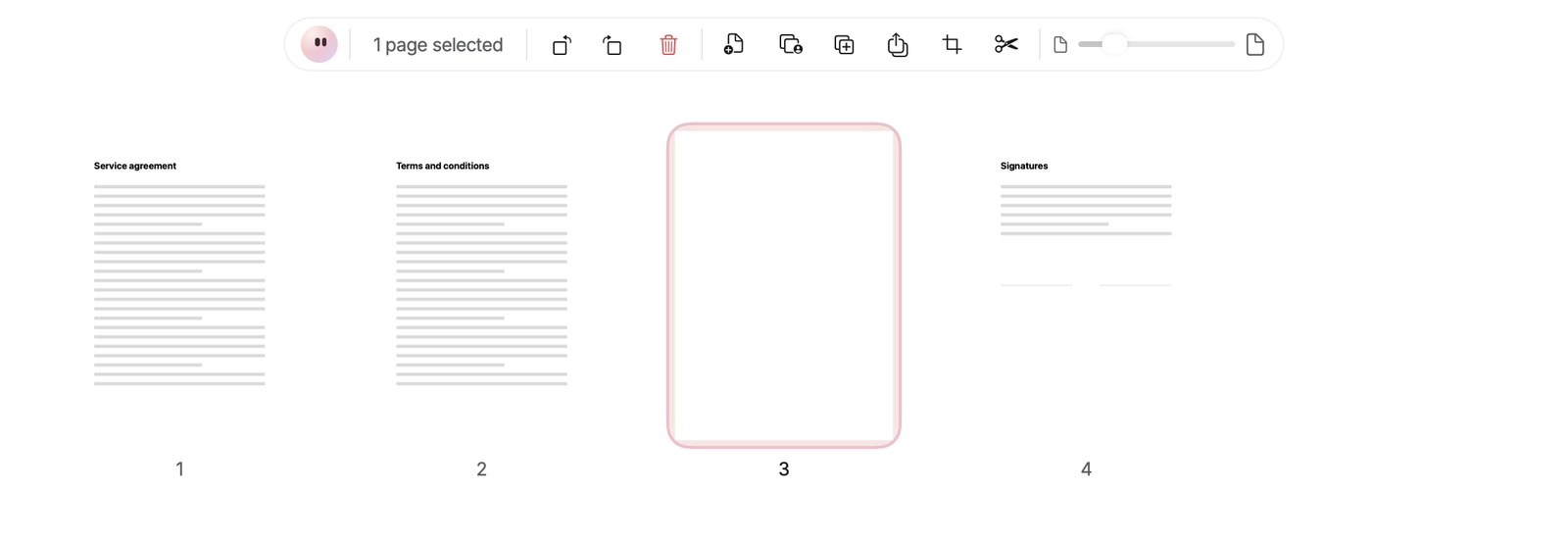
Delete, reorder, rotate, duplicate or extract pages in a grid. ⌘-click to pick several, ⌘Z to step back. Drag a PDF or an image onto the grid to insert it where you drop it.
Signature
Draw it on the trackpad, type your name in a handwriting font or import an image. It's kept in this Mac's keychain, never sent, and lands on the page with one click.
Forms
Click a field to fill it in, tick the checkboxes, pick from the lists. Paper can also add fillable fields to a PDF that came without any.
Text
Highlight, underline, add a note or type on the page. The Edit Text & Images tool changes a line that's already in the PDF or swaps out an image.
Redaction
Black out a passage or an area for good. Paper finds email addresses, phone numbers and IBANs, then saves a redacted copy. The original stays exactly as it was.
Everything else
Merge several PDFs, split a document, reduce its size, lock it with a password of at least 4 characters, export it as images or text. Images and Office documents become PDFs.
Is Preview enough, or do you need a PDF editor for Mac?
For part of the job, Preview does fine. The app that comes with macOS already deletes and reorders pages, adds a signature, highlights text and fills in most forms. If that covers what you do with PDFs, keep using it. Just remember that Preview writes your edits into the file you opened, so a page you delete there is gone once you close it, unless you made a copy with File > Duplicate first.
Paper earns its place when a document pushes back. Preview can't change a line of text already printed in the PDF, can't create fillable fields and doesn't export to Word. Paper does all of that. It also adds real redaction, which spots the email addresses, phone numbers and IBANs in a bank statement or a contract by itself and then saves a separate copy, so the version you send carries none of them.
Export and convert
A PDF can leave Paper as a Word document, as images, as plain text, or as Excel, PowerPoint, HTML and RTF. Going the other way, an image or an Office document becomes a PDF. To combine files, choose File > Merge PDFs… or press ⌥ ⌘ M, pick at least two PDFs, and Paper joins them in file-name order.
Compare two versions
Version 2 of a contract just landed and you want to know what moved. Compare Two PDFs… shows the differences between the two files, which spares you a line-by-line reread of twelve pages.
Delete pages from a PDF in three steps
- Pages modeClick Pages at the top of the window. Every page of the document appears in a grid.
- SelectClick a page, ⌘-click to add another, ⇧-click to select a run of pages.
- DeleteClick the red trash button in the bar or press ⌫. ⌘Z brings the pages back if you change your mind.
The full walkthrough, with Preview and with Paper, is in our guide to deleting a page from a PDF on a Mac. To turn a stack of iPhone photos into one PDF, start with converting HEIC photos to JPG on a Mac, or let Eyno Convert merge several images into a single PDF in one drag. When a report needs a screenshot, Eyno Draw captures and marks up the screen, and dropping the image onto the Pages grid adds it as a new page.
Included in the Eyno subscription
One subscription, eight Mac apps
Eyno Paper is part of Eyno. You pay €5.99 a month or €59.90 a year, VAT included, for Paper and the seven other apps in the suite. The trial lasts 7 days, needs no credit card and opens all eight apps. Paper is a 147 MB download and needs macOS 15 or later. If you only open a PDF editor for Mac a few times a year, try the apps in the demo Mac on the home page before you install anything.
Questions
Before you try it
Are my PDFs sent anywhere?
No. Eyno Paper opens and edits your PDFs on your Mac without sending them to a server. Your signatures are kept in this Mac's keychain.
Can I undo deleting a page?
Yes, ⌘Z brings deleted pages back. Paper always keeps at least one page in the document.
How do I sign a PDF on Mac without printing it?
In Annotate mode, choose the Sign tool. Draw your signature on the trackpad, type your name in a handwriting font or import an image, then click the page to place it.
What does redaction do?
It covers text or an area for good. Paper can find email addresses, phone numbers and IBANs, then creates a redacted copy. Your original document doesn't change.
How much does Eyno Paper cost?
Eyno Paper is part of the Eyno subscription, €5.99 a month or €59.90 a year for all eight apps. The trial lasts 7 days and needs no credit card.