 Eyno
Download

Eyno Write · word processing
A word processor for Mac that opens your Word files
Eyno Write is a word processor for Mac built for everyday documents. A letter to the council, a CV, the minutes of a club meeting. Start from a blank page or from one of its 24 templates. Word files people send you open as they are and go back out as .docx, or as a PDF.
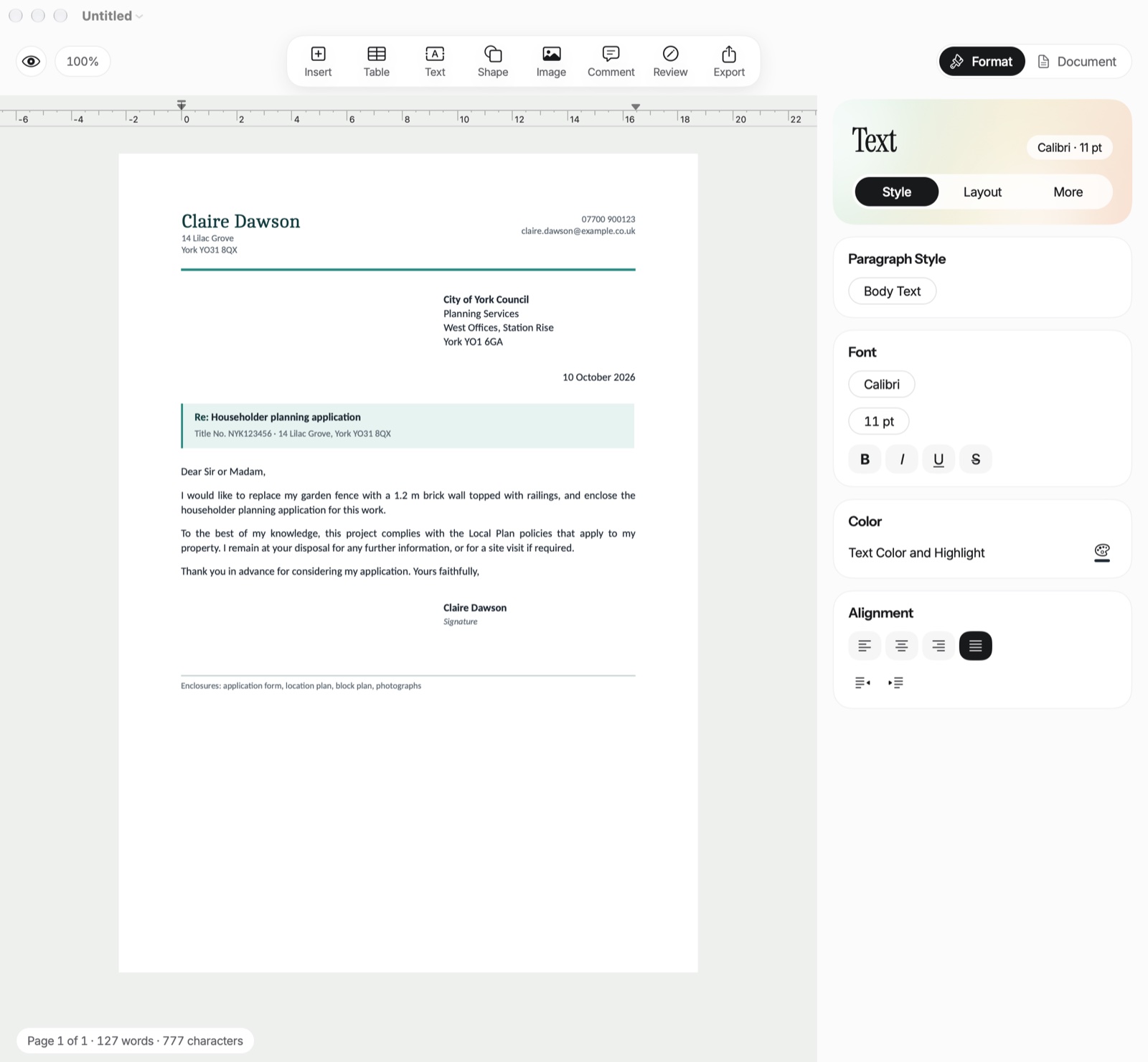
What this word processor for Mac does
The toolbar holds what you add to a page: Insert, Table, Text, Shape, Image, Comment, Review and Export. On the right, the Format tab handles the selected text, from the paragraph style to the alignment. If you'd rather have a row of buttons above the document, switch from the Settings Sidebar to the Classic Bar.
Templates
24 templates in 6 families, from Letters to Hobbies and Games. Cancellation, Complaint, CV, Invoice, Quote, Minutes and Recipe are ready to fill in. The Template Gallery opens with ⇧⌘N.
Styles
Body Text, Title, Subtitle, Heading 1 to 3 and Quote, with shortcuts starting at ⌥⌘1. A Word document arrives with its own styles, and Write keeps them and lets you edit them.
Review
Track Changes starts with ⌥⌘R. Every change carries its author and date, and you accept or reject them one at a time or all at once. ⌥⌘M adds a comment in the margin.
Tables and images
Merge or split cells, give them a background color, drag the borders. An image sits in the text, in front of it or behind it. Remove Background and Enhance (light and color) run on the Mac.
The page
A4, US Letter or A5, Narrow, Normal, Wide or Custom margins, 1 to 3 columns. Headers and footers with page numbers, a different first page if you need one, a table of contents and footnotes (⌥⌘F).
Writing
The macOS spelling and grammar checker works as you type, and text replacements fill in what you type often. ⌘K adds a link. Text boxes and shapes are there too.
Can I send the file to someone who uses Word?
Yes. It's usually the first thing people ask before trying a Word alternative for Mac. Write saves in .docx, Word's own format. The other person gets a file they open the way they always do, and whatever they change comes back to you the same way.
In both directions, Write keeps styles, lists, tables, images, footnotes, headers and footers, page numbers, columns, links, comments and tracked changes. Calibri and Cambria show up in close look-alike fonts and are written back under their real names. When something can't be kept exactly, such as more than 3 columns, a chart or grouped objects, Write tells you.
Open Word documents on a Mac, and a few other formats
Write opens .docx files, and also older .doc files, OpenDocument .odt, .pages files, RTF and plain text. The .doc, .odt, .pages and .rtf files are converted on the Mac by a built-in converter, with macros turned off.
What Write doesn't do
It saves only as Word (.docx). It exports PDFs with ⇧⌘E and prints with ⌘P, but there's no RTF, ODT or Pages export. There's no real-time co-editing either. To share a document, you send it.
Track changes with someone who uses Word
Turn on Track Changes, edit, and send the .docx. Insertions show underlined and deletions struck through, and comments sit in the margin. When the file comes back with the other person's edits, each one still has its author and date, and Accept All or Reject All settles them in one go.
A letter ready in three steps
- Template GalleryPress ⇧⌘N, then pick Letter in the Letters family.
- Fill it inReplace the name, address, subject line and text with yours. The Format tab sets each paragraph.
- Send itSave as .docx for someone on Word, or press ⇧⌘E for a PDF.
If you'd rather speak the first draft, Eyno Voice, the dictation app of the suite, types wherever the cursor is, in Write or anywhere else. And when a PDF comes back to be signed, open it in Eyno Paper, the PDF editor for Mac.
Included in the Eyno subscription
One subscription for Write and seven other apps
Eyno Write is part of Eyno. You pay €5.99 a month or €59.90 a year, VAT included, for Write and the seven other Mac apps, and the Eyno pricing page compares both plans. The trial lasts 7 days, needs no credit card and opens all eight apps. Write needs macOS 15 or later. You can also try it first in the demo Mac on the home page before you install this word processor for Mac.
Questions
Before you start writing
Will my Word file keep its layout?
For the most part, yes. Styles, lists, tables, images, footnotes, headers, footers, comments and tracked changes are kept. If something can't be kept exactly, a chart for example, Eyno Write tells you.
Can Eyno Write open Pages or OpenDocument files?
Yes. Pages, .odt, .doc and RTF files are converted on your Mac when you open them, with macros turned off. Eyno Write then saves them as Word (.docx).
Does Eyno Write have track changes?
Yes. Choose Track Changes in the Review menu or press ⌥⌘R. Each change shows its author and date, and you can accept or reject everything at once. ⌥⌘M adds a comment.
How do I turn a document into a PDF?
Choose Export as PDF or press ⇧⌘E. To print it, press ⌘P. Eyno Write doesn't export to RTF, ODT or Pages.
How much does Eyno Write cost?
Eyno Write is part of the Eyno subscription, €5.99 a month or €59.90 a year for all eight apps. The trial lasts 7 days and needs no credit card.