 Eyno
Download

Eyno Voice · dictation and meetings
Speech to text for Mac that types where your cursor is
Eyno Voice is a dictation app for Mac, also available on iPhone. Hold down the fn key anywhere, talk, then let go, and the text lands in the email, message or note you were writing. The same app records your meetings and writes a summary of them. Your voice is recognized on the Mac itself, and the audio never leaves it.
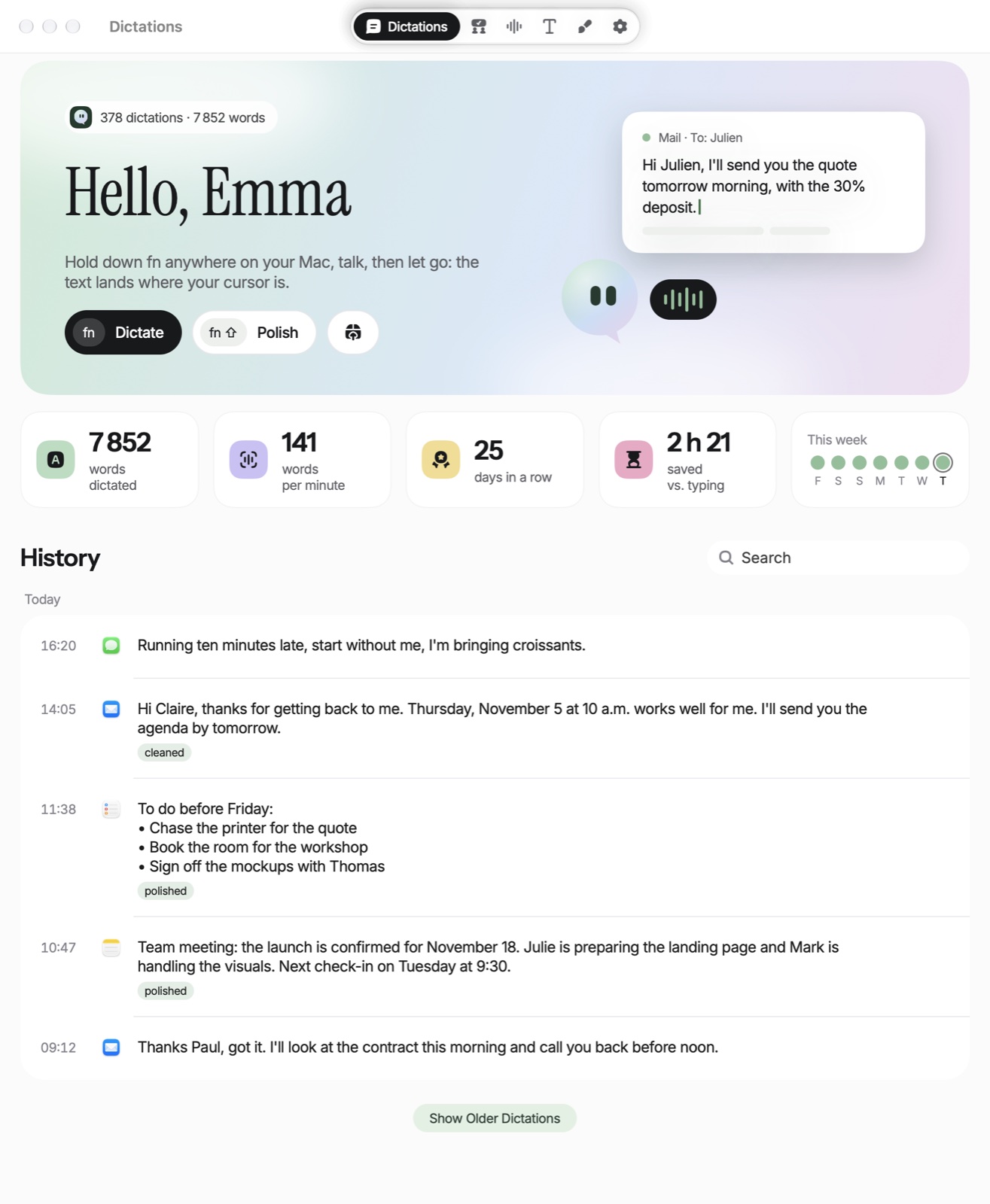
What Eyno Voice does
Speech to text for the Mac only pays off when it's faster than typing, so Voice has no window to open before you talk. It sits in the menu bar and answers the fn key in every app, which makes voice typing as quick as reaching for the keyboard. One dictation can run up to about 20 minutes, and longer ones are split at the silences. On a Mac with 16 GB of memory or more, Instant dictation keeps the model loaded and saves about 0.7 seconds each time.
The fn key
Hold it, talk, let go. Voice pastes the text with ⌘V, then puts your previous clipboard back about 0.8 seconds later. A tap shorter than 0.4 seconds cancels.
Styles
Normal writes exactly what it heard. Cleaned removes the ums and false starts and adds punctuation. Polished turns it into a well-written text that keeps your idea. fn + Shift always uses Polished.
Your own styles
A name and an instruction of up to 1,000 characters make a new style. Each app can also keep its own, say Polished in Mail and Normal in Messages.
Rewrite
Select some text you already wrote, hold fn + Control and say what should change. What you say becomes the instruction, and Voice rewrites the selection.
Dictionary and voice shortcuts
The dictionary fixes words it knows and learns from the corrections you make after a paste. A voice shortcut swaps a phrase like “my signature” for a saved text.
History
The Dictations tab keeps everything: redo the transcription, clean it up, polish it, export the audio or delete it. Transcribe an Audio File reads a WhatsApp voice note in .opus or an .m4a file.
Speech to text for the Mac: where does your voice go?
Recognition runs on your Mac with the Whisper large-v3-turbo model. It downloads once, weighs 1.6 GB and needs 2.1 GB of free space. The audio never leaves the Mac. With the Normal style nothing is sent anywhere, and dictation even works offline once the model is in place.
Styles that rewrite the text make a round trip. With Cleaned, Polished, a style of your own, Rewrite or a meeting summary, only the text goes to Eyno's server. The server has it rewritten by a Claude model from Anthropic and doesn't keep it. If the result drifts too far from what you said, Voice pastes the raw text instead. If the cleanup fails, the raw text is still on your clipboard.
Transcribe meetings on Mac without a bot in the call
The Meetings tab records an online call on two tracks, “You” for your microphone and “Others” for the Mac's sound. No bot joins the conversation. In person, Voice listens through the microphone alone. Speakers are recognized on the Mac, a recording can last up to about 6 hours, and each meeting gets a summary you can file in a folder. Later, you can ask all your meetings a question at once.
99 languages, no translation
Voice recognizes 99 languages. You can pick several, and each part of a dictation is matched among them. The cleanup never translates, so what you say in Spanish stays in Spanish.
Voice typing in three steps
- The cursorClick where the text should go: an email, a note, a search field.
- Hold fnTalk normally. The dictation bar shows the mascot, the elapsed time and the chosen style.
- Let goThe text pastes itself. Without the Accessibility permission, Voice copies it and shows “Copied: press ⌘V to paste”.

For a letter or a report that needs a proper layout, dictate straight into Eyno Write, the word processor in the suite. To keep one task in mind for a whole hour, Eyno Focus and its pomodoro timer keeps you company while you work.
Included in the Eyno subscription
Voice and seven other apps, one subscription
Eyno Voice is part of Eyno. You pay €5.99 a month or €59.90 a year, VAT included, for Voice and the seven other apps in the suite. The trial lasts 7 days, needs no credit card and opens all eight apps. Voice needs macOS 15 or later. Before installing speech to text for your Mac, you can try the apps in the demo Mac on the home page and compare the monthly and yearly plans.
Questions
Before your first dictation
Is my voice sent over the internet?
No. Recognition happens on your Mac and the audio never leaves it. With Cleaned, Polished, a custom style, Rewrite or a meeting summary, only the text goes to Eyno's server, which has it rewritten by Claude, from Anthropic, and doesn't keep it. The Normal style sends nothing.
Does Eyno Voice work offline?
Yes, in the Normal style, once the 1.6 GB model has been downloaded. The styles that rewrite the text and the meeting summaries go through Eyno's server, so they need a connection.
Do I have to say the punctuation out loud?
No. Voice has no commands like “comma” or “period”. The Cleaned style adds the punctuation and removes the hesitations. For a text ready to send, fn + Shift switches to Polished.
Does a bot join my video calls?
No. Voice records the call from the Mac on two tracks, your microphone on one and the Mac's sound on the other. Nobody is added to the meeting.
How much does Eyno Voice cost?
Eyno Voice is part of the Eyno subscription, €5.99 a month or €59.90 a year for all eight apps. The trial lasts 7 days and needs no credit card.