 Eyno
Download

Eyno Vault · passwords
A password manager for Mac that keeps the key with you
Eyno Vault is a password manager for Mac and iPhone. It keeps your logins, verification codes, payment cards and ID documents in a vault that is encrypted on the device, then fills in sign-in fields for you in Safari and in apps. You remember one password, your own, and nobody else can open the vault.
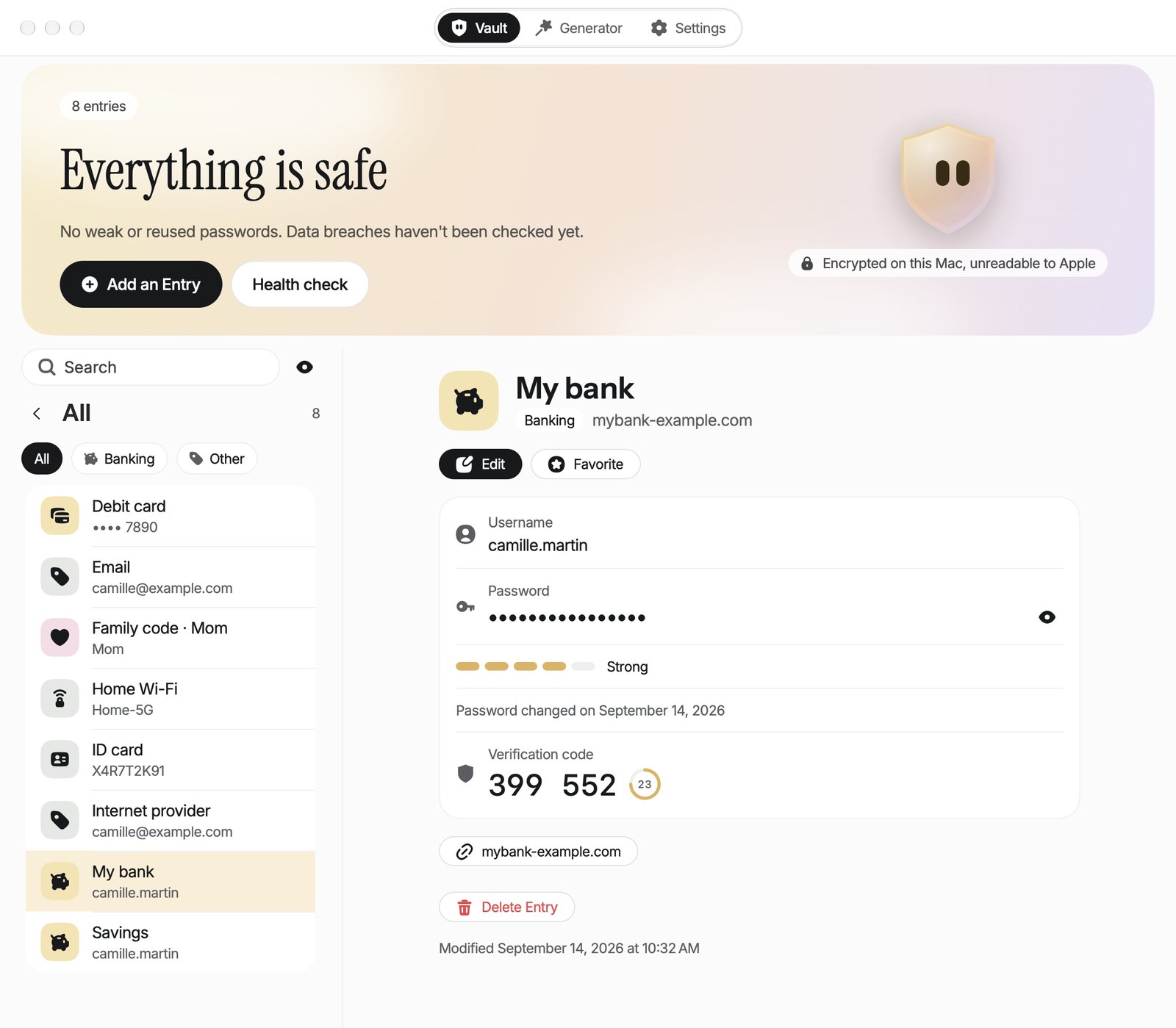
What this password manager for Mac does
Vault opens on three tabs, Vault, Generator and Settings. In the vault, the entry you pick opens to the right of the list. On the Mac a shield also waits in the menu bar, and ⌥ ⌘ K opens a small panel that makes a new password without leaving the page you're on.
The vault
Logins, payment cards, ID documents and Wi-Fi networks. A family code of 6 digits changes every 30 seconds and goes to your relatives by QR code. Every entry has its own encrypted notes, and a deleted one stays in the Trash for 30 days.
Password generator
From 8 to 64 characters, 20 by default, with Avoid Ambiguous Characters. Or a passphrase of 6 words drawn from a list of 2,048, in English or French, or a PIN of 4 to 12 digits. Site Rules handle sites that refuse some symbols.
2FA codes
Scan a site's QR code or type its setup key. Vault works out the 6 to 8 digit code and fills it in for you when you sign in.
AutoFill
Vault plugs into the AutoFill built into macOS and iOS, in Safari and in apps, with no browser extension. Touch ID, Face ID or the master password confirms each fill.
Health check
It flags passwords that are weak, reused, more than 3 years old or found in a known breach, plus cards and ID documents that expire within 3 months.
Import
A CSV export from Apple Passwords, Safari, Chrome, Firefox, Bitwarden or 1Password comes in with its 2FA codes. Duplicates are skipped. Backups go out as an encrypted .knox file.
Where are my passwords kept?
On your device. This password manager for Mac encrypts the data before saving it. Your master password goes through PBKDF2 with 600,000 iterations to unlock a random 256-bit key, and each entry is encrypted separately with AES-256-GCM. The vault file holds nothing but ciphertext. The Eyno account that runs your subscription never sees the vault either.
Your passwords on iPhone and Mac
Sync goes through your own iCloud, in its private database, and only the encrypted vault is sent. Apple stores it without being able to read it. For Touch ID and Face ID, a copy of the key stays in that device's keychain and stops working if a new finger or face is added. A copied password stays on the clipboard of that device only and is cleared after 60 seconds, or as soon as the vault locks.
Health check and Auto-Lock
To spot a breach, Vault asks Have I Been Pwned using the first 5 characters of a SHA-1 hash, never the password itself. The vault locks on its own after 5 minutes by default, or after 1 minute, 15 minutes or 1 hour if you change it, and also when the Mac sleeps or locks its session.
What Vault doesn't do
It doesn't handle passkeys yet, and it can't share an entry with another person. And only you know the master password. If you forget it, the recovery kit gets you back in. It's a sheet you print from Vault with a key of 8 groups of 4 characters. Without that kit the vault stays locked for good, for you and for Eyno alike. That's the trade-off for a vault nobody else can open.
Switch to Eyno Vault in three steps
- Create the vaultPick a master password, then print the recovery kit and put the sheet somewhere safe.
- ImportExport your passwords as a CSV from your old tool, then choose Import… in Vault and delete the CSV.
- Sign inOn a website, AutoFill suggests your username. Touch ID confirms and the field fills itself.
To AutoFill passwords on Mac, Vault never asks you to install anything in the browser. You can also open Vault and the seven other apps in the demo Mac on the home page before you download anything. When a bank sends a contract to sign, the Eyno Paper PDF editor comes with the same subscription.
Included in the Eyno subscription
One subscription, eight Mac apps
Eyno Vault is part of Eyno. You pay €5.99 a month or €59.90 a year, VAT included, for Vault and the seven other apps in the suite. The trial lasts 7 days, needs no credit card and opens all eight apps. Vault needs macOS 15 or later and is on iPhone too. Both plans are laid out on the Eyno subscription pricing page, and the app is waiting on the page to download Eyno Vault.
Questions
Before you try it
What happens if I forget my master password?
The recovery kit, the sheet you print from Vault with its key of 8 groups of 4 characters, opens the vault again. Without that kit, nobody can open the vault, not even Eyno.
Does Eyno Vault support passkeys?
Not yet. Vault keeps passwords, 2FA codes, payment cards, ID documents and Wi-Fi networks. It also can't share an entry with another person.
Can I bring my passwords from another password manager?
Yes, from a CSV export, 2FA codes included. Entries already in the vault are skipped. Delete the CSV file afterwards, because it holds your passwords in plain text.
How does the vault get from my iPhone to my Mac?
Through your own iCloud account, which only receives the encrypted vault. Apple stores it without being able to read it, and the Eyno account never sees it.
How much does Eyno Vault cost?
Eyno Vault is part of the Eyno subscription, €5.99 a month or €59.90 a year for all eight apps. The trial lasts 7 days and needs no credit card.