
How the Pomodoro Technique Works

The Pomodoro Technique is a time management method built on short, timed blocks. You pick one task, work on it for 25 minutes, take a 5-minute break, and after four rounds you take a longer one. A kitchen timer is all it needs, and a Mac or an iPhone can do the timing too.

Updated October 31, 2026 · Verified on macOS 27 · 7 min read

Key takeaways

  • One pomodoro is 25 minutes of work on a single task, then a break of about 5 minutes. After four comes a break of 15 to 30 minutes.
  • Four pomodoros and their three short breaks take 1 hour 55 minutes, or 2 hours 10 minutes with a 15-minute long break.
  • 25 minutes is the original length, a convention you can change. Writing or coding often goes better in 50-minute blocks.
  • A kitchen timer or the Mac's Clock app is enough. Eyno Focus chains the phases and counts the cycles for you.

What is the Pomodoro Technique?

Francesco Cirillo, an Italian student, worked out this method at the end of the 1980s. He timed himself with a kitchen timer shaped like a tomato, and pomodoro is Italian for tomato. The name stuck to each block too: one pomodoro is one timed stretch of work on one task.

You decide what to work on before the timer starts, keep that time free of everything else, and stop when it rings, even when things are going well. The breaks belong to the method as much as the work.

The five steps of the Pomodoro Technique

Paper, a pencil and any timer will do.

  1. Choose one taskWrite it down first, in one sentence. “Draft the report's introduction” beats “work on the report”. Split big tasks into pieces.
  2. Set the timer to 25 minutesA kitchen timer, your phone or the Clock app on your Mac.
  3. Work on that task onlyKeep going until it rings. If a thought or a to-do comes up, write it on a sheet and go back to the task.
  4. Take a short breakAbout 5 minutes. Stand up, drink some water, then start the next pomodoro.
  5. After four, take a long breakCirillo's original range is 15 to 30 minutes. Tick off each finished pomodoro on your sheet.

Why 25 minutes, and how long four pomodoros take

Twenty-five minutes is the length Cirillo used. It is short enough to start a task you dread and long enough to finish a page of notes or a batch of emails. It is a convention, and you can move it.

25/5 or 50/10?

Match the length to the work. Writing or coding take time to get going, and a 25-minute block can end just as you get into it, so 50 minutes with a 10-minute break often suits them better. Reading and revision, or any tiring work, fit 25 minutes, or 15 to 20 when you are worn out. Give a length a few days before changing it.

The math of a cycle

Four pomodoros make 100 minutes of work. With the three 5-minute breaks between them, that is 1 hour 55 minutes, and a 15-minute long break brings the cycle to 2 hours 10 minutes. About four pomodoros fit in 2 hours.

There is no set number per day. Most people get far fewer real pomodoros than hours at the desk. Count yours for a week, then pick a daily number you can reach.

What to do when something interrupts you

Interruptions come in two kinds.

  • From inside. A thought, the urge to check your email. Write it on the sheet and keep working.
  • From outside. A colleague asks you something, the phone rings. If it can wait, say you will get back to them in a few minutes and note it down.

When a pomodoro is truly broken, start it again from zero rather than counting half of it.

The Pomodoro Technique for studying

Split the material into tasks of one or two pomodoros, like a biology chapter or twenty vocabulary words. During the pomodoro, test yourself instead of rereading. Close the book and write down what you remember, or explain the idea out loud. If you would rather say your notes than write them, Eyno Voice, the dictation app of the suite, pastes them where your cursor is when you let go of the fn key.

A study morning in pomodoros

  • 9:00 to 10:55. Four pomodoros of chemistry, two on the chapter, one on practice problems, one on the mistakes.
  • 10:55 to 11:20. A 25-minute long break, away from the desk.
  • 11:20 to 12:15. Two pomodoros of history, one to rewrite the timeline from memory, one to check it against the book.

Take the breaks away from the screen.

The Pomodoro Technique for ADHD

Some people with ADHD find that short, timed blocks make it easier to start a task and to come back to it after a distraction. Others find a countdown stressful. The technique is not a treatment. If it helps, adjust the lengths freely, and 15 minutes of work is a fine pomodoro. For medical questions, talk to a doctor or another health professional.

Drawbacks of the method

  • It can cut a good flow. When the timer rings mid-sentence, finish the sentence or the idea, then stop.
  • Meetings and on-call work don't fit. Keep pomodoros for the hours you control.
  • A rigid timer stresses some people. If watching the countdown makes you tense, hide it or try longer blocks.
  • The break has to be a real break. Five minutes on the phone often turns into twenty, and the next pomodoro starts late.

Setting a Pomodoro timer on a Mac or iPhone

On a Mac with macOS 27, the Clock app does the job.

  1. Open Clock and go to Timers.
  2. Choose Add New Timer, set 25 minutes and click Start.
  3. When it shows Timer Done, set 5 minutes for the break and start again.

The Start Recent Timer menu item brings back your 25 minutes for the next pomodoro. The limit of a plain timer is that you restart every phase by hand and count the cycles yourself. A Pomodoro app does that bookkeeping.

Eyno Focus · focus timer for Mac and iPhone

Running pomodoros with Eyno Focus

Eyno Focus, the focus timer of the Eyno suite, opens from the menu bar on the Mac and also runs on the iPhone.

  1. Write your taskIn the Session tab, the field reads “Write your task here, one sentence is enough.”
  2. Choose PomodoroBy default, 25 minutes of work, a 5-minute Short break and a 15-minute Long break every 4 cycles. All adjustable.
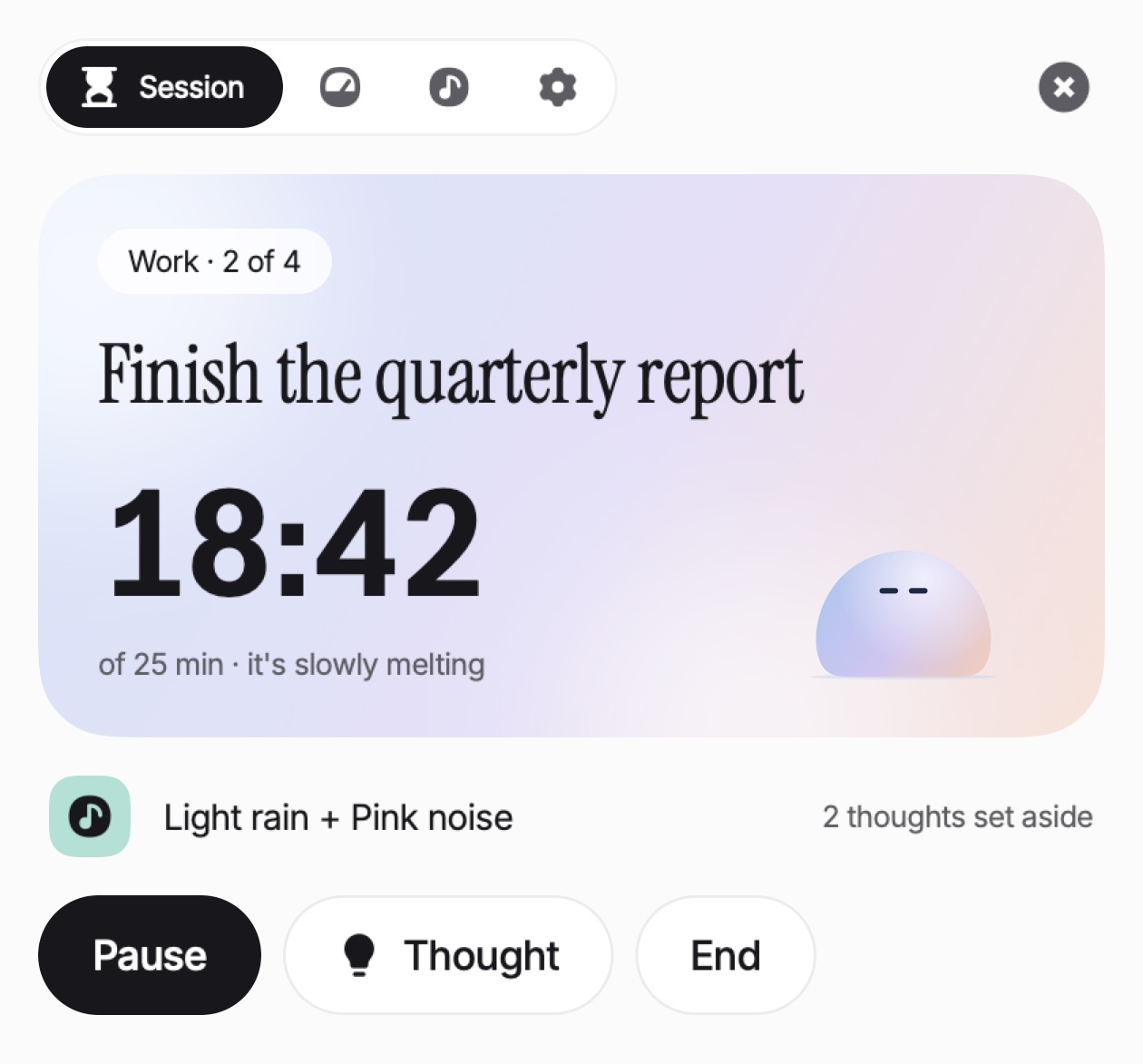
  3. Click StartFocus chains work and breaks and counts the cycles, as in “Work · 2 of 4”.
The Session tab of Eyno Focus during a Pomodoro session. A pill reads Work · 2 of 4 above the example task Finish the quarterly report. The timer shows 18:42, with of 25 min · it's slowly melting underneath, next to the mascot, a soft lilac blob. Below sit the sounds Light rain + Pink noise, the line 2 thoughts set aside, and the Pause, Thought and End buttons.
The Eyno Focus panel as the app draws it, in the second work block of four. The task is an example. The mascot sinks a little as the cycle goes by.

The Thought button is the sheet of paper from step 3. It notes a passing thought without leaving the task, and ⌃ ⌥ P does the same from anywhere on the Mac. Your thoughts come back at the end of the session. Stopping in the first 5 minutes is a false start and doesn't count.

Focus does not block websites or apps. You list the Apps that distract you, and opening one during work brings up a card that asks “Are you sure?”. Back to my task hides the app, and the “Open … anyway” button allows it for 10 minutes.

You can mix white, pink or brown noise with 15 recorded ambiences such as rain or a café. On the iPhone, the timer shows on the Lock Screen and in the Dynamic Island. Focus runs on macOS 15 or later.

Questions

The Pomodoro Technique, common questions

What are the 5 steps in the Pomodoro Technique?

Choose one task and write it down. Set a timer for 25 minutes. Work on that task only until it rings. Take a break of about 5 minutes. After four pomodoros, take a longer break of 15 to 30 minutes.

Which is better, 25/5 or 50/10 pomodoro?

Neither suits everyone. 25/5 is the original and fits reading and revision. 50/10 often suits writing or coding, which take a while to get into.

What is the 80/20 rule Pomodoro Technique?

There is no official 80/20 rule in the method. The 80/20 rule usually means the Pareto principle, a separate idea that a small share of causes produces most of the results.

Why is it called Pomodoro?

Pomodoro means tomato in Italian. Francesco Cirillo, who created the method as a student, timed his work with a tomato-shaped kitchen timer.

Is there a free Pomodoro timer on a Mac?

Yes, the Clock app. In Timers, set 25 minutes and click Start, then 5 minutes for the break. You restart each phase and count the cycles yourself.

A kitchen timer or Eyno Focus

The Pomodoro Technique works with any timer and a sheet of paper. If you run pomodoros on your Mac every day, Eyno Focus chains the phases and keeps your stray thoughts. The trial lasts 7 days, needs no card and opens all eight Mac apps. After that, the Eyno subscription costs €5.99 a month or €59.90 a year for all eight. You can also try the apps in the demo Mac on the home page before installing anything.