 Eyno
Download

Eyno Convert · file conversion
A file converter for Mac that works in one drag
Eyno Convert is a file converter for Mac that lives in the menu bar. Hold Shift while you drag a file, wherever it is, and a wheel opens under the pointer. Drop the file on a petal and the converted copy appears next to the original. Photos, PDFs, videos, sounds, documents and zip files all go through the same gesture.
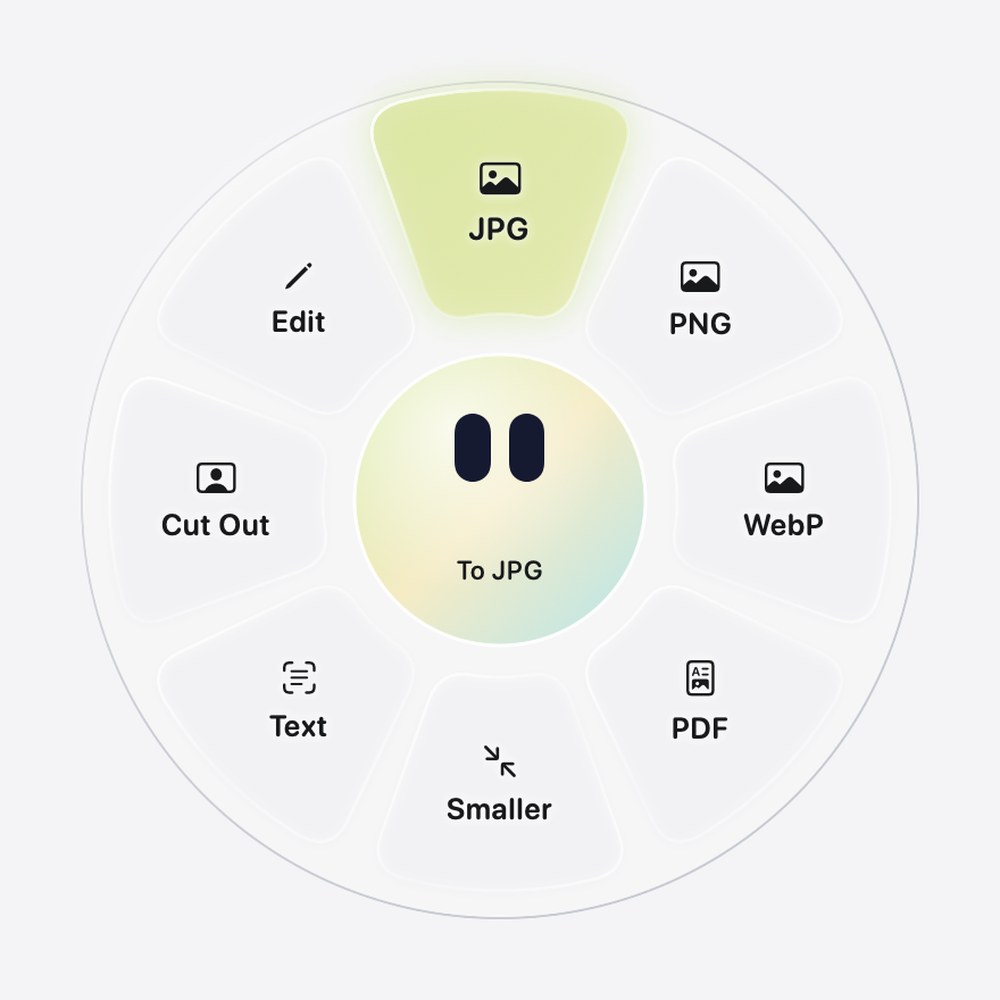
What Eyno Convert does
Convert knows nearly 175 transformations, and the wheel only shows the ones that fit the file you're dragging, so a HEIC photo gets JPG, PNG, WebP, PDF, Smaller, Text, Cut Out and Edit while a video gets MP4, MOV, GIF, Audio, Smaller and Trim and a zip file only gets Unzip. The app sums up the gesture in one line, Drag a file while holding Shift. The original is never changed. The new file takes the same name with the new extension, and if that name is already taken, a number is added. Drop several files at once and each one is converted.
Photos and images
JPG, PNG, HEIC, WebP or PDF, and several images become a single PDF. Cut Out removes the background and gives you a PNG. An animated GIF turns into an MP4 video.
Smaller and Text
Smaller limits a photo to 1,920 pixels on its long side, as a JPG at 75% quality, ready to send. Text reads the words in an image into a .txt file, on the Mac.
JPG or PNG with one image per page at 300 dpi. Text reads scanned pages too, and Word turns the PDF into a document. Several PDFs become one, and Split makes one PDF per page.
Video
MP4, MOV or GIF. Audio keeps only the sound as an M4A file, Smaller makes the video lighter to send, and Trim keeps the part you want.
Sound
MP3, M4A, WAV or AIFF, and Trim to keep a single passage of a long recording.
Documents and zip
Word, RTF, OpenDocument and plain text become PDF, Word or Text. Unzip opens a zip, and a folder or a mix of files goes into one.
The Finder converts images, so why a file converter for Mac?
For images, the Mac already has you covered. In the Finder, Control-click a photo and choose Quick Actions > Convert Image, or open it in Preview and use File > Export…. Both turn a HEIC into a JPG or a PNG without installing anything, and for a handful of photos that's the right tool.
They stop at images, though. A video, a sound, a PDF you need as a Word file or a zip someone sent you each call for another tool. Convert puts them behind the same Shift-drag, with no window to open and no menu to remember. Every conversion runs on the Mac, and nothing is uploaded.
Convert MOV to MP4
A .mov file from a screen recording doesn't open everywhere. Drop it on the MP4 petal and the MP4 copy lands next to the original, with the same name.
Compress a video on Mac before you send it
The Smaller petal makes a video lighter to send, and Trim keeps only the part that matters. Audio pulls the sound out on its own when the picture doesn't matter, for a talk or an interview.
What doesn't travel with the file
Convert doesn't copy the metadata, such as EXIF data or the GPS location, into the new file, so a photo you share doesn't say where it was taken. Good for privacy. A transparent image sent to JPG is placed on white.
Convert HEIC to JPG in three steps
- Hold Shift and dragStart dragging the photo while holding Shift. A wheel opens under the pointer.
- Drop on JPGRelease the file on the JPG petal at the top. The center reads To JPG while you hover over it.
- Find the copyThe JPG appears next to the original with the same name. The HEIC file is never modified.
Every free method, with the Finder, Preview and Photos, is in our guide to converting HEIC to JPG on a Mac. For the .mov files you get from a screen recording on Mac, the MP4 petal is the one you want. Once your images are a PDF, Eyno Paper reorders, signs and edits the pages, and a demo recorded with Eyno Show, the screen recorder of the suite already exports as MP4. To shrink a photo before you send it, the guide to compressing an image on a Mac compares Preview, Photos, Mail and the Smaller petal.
Included in the Eyno subscription
Part of one subscription with seven other apps
Eyno Convert is part of Eyno. You pay €5.99 a month or €59.90 a year, VAT included, for Convert and the seven other Mac apps. The trial lasts 7 days, needs no credit card and opens all eight apps. Convert is a 9 MB download and needs macOS 15 or later. You can also try the apps in the demo Mac on the home page before installing this file converter for Mac.
Questions
Before your first conversion
Does Eyno Convert upload my files?
No. Every conversion runs on your Mac and nothing is uploaded. The original file is never modified.
Where does the converted file go?
Next to the original, with the same name and the new extension. If a file with that name already exists, Convert adds a number.
Can I convert several files at once?
Yes. Drag them together while holding Shift and each one is converted. Several images can become a single PDF, and a mix of images and PDFs becomes one PDF in file-name order.
How do I convert MOV to MP4 on a Mac?
Hold Shift, drag the .mov file and drop it on the MP4 petal. The MP4 appears next to the original. The Smaller petal makes the video lighter to send, and Trim keeps just one part.
How much does Eyno Convert cost?
Eyno Convert is part of the Eyno subscription, €5.99 a month or €59.90 a year for all eight apps. The trial lasts 7 days and needs no credit card.